A smart thermostat won’t save money on its own. It saves money by making it effortless to do what saves energy: setting the temperature back when no one’s home or everyone’s asleep, without forgetting and without sacrificing comfort. ENERGY STAR estimates that certified smart thermostats save about 8% on heating and cooling bills on average. Choosing the right one is less about the screen and more about the features that actually change how your system runs.
Table of Contents
Start with ENERGY STAR certification
ENERGY STAR certifies smart thermostats based on real-world data showing they reduce heating and cooling runtime. Certification is a good first filter, and many utilities offer rebates only on certified models. Check your utility’s website before you buy; rebates can lower the price considerably.
The features that drive savings
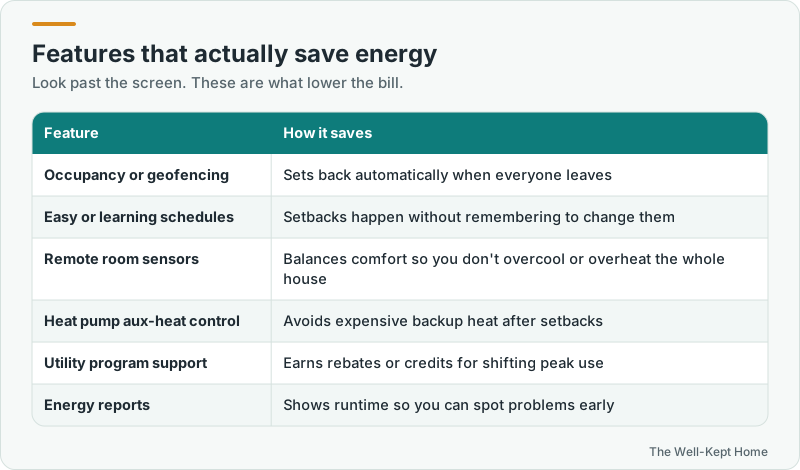
- Occupancy detection or geofencing. The thermostat notices when everyone has left, using motion sensors or the location of household phones, and sets back automatically.
- Learning or easy scheduling. Some models learn your patterns; others make schedules simple to set in an app. Either way, the point is setbacks that actually happen.
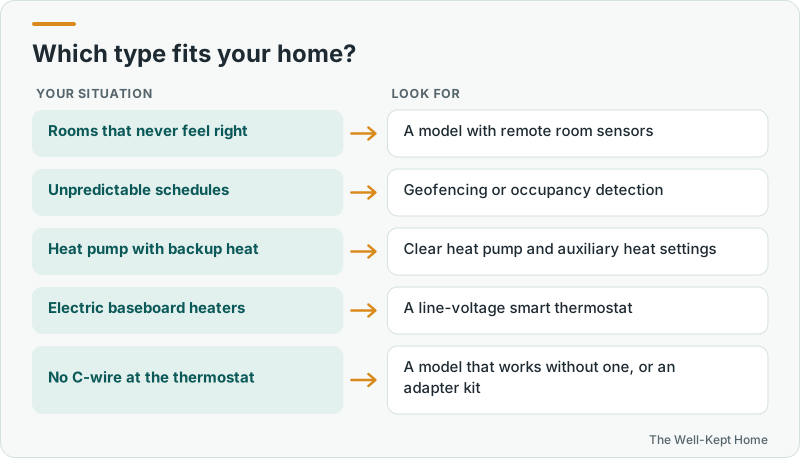
- Remote room sensors. A thermostat in a hallway often misjudges the rooms you use. Sensors let it average or prioritize the rooms that matter, so you’re not overcooling the whole house to fix one hot bedroom.
- Heat pump and auxiliary heat controls. Good heat pump support avoids triggering expensive electric backup heat after a setback.
- Utility program integration. Many thermostats can enroll in demand-response programs that pay you or credit your bill for small adjustments during peak hours.
- Energy reports and alerts showing runtime, which can flag problems such as a system running much longer than usual.
Check compatibility first
Before you buy, confirm the thermostat works with your system:
- System type: furnace, central AC, heat pump, dual fuel, boiler, or multi-stage equipment.
- C-wire: most smart thermostats need a common wire for continuous power. Some include an adapter, and some models are designed to work without one on many systems.
- Line-voltage heat: electric baseboard heaters use high-voltage thermostats and need a smart thermostat built for line voltage.
Every major manufacturer has an online compatibility checker. Take a photo of the wires behind your current thermostat and use it.
Well-known options
These are widely available lines, described by their main strengths rather than ranked:
- Google Nest Learning Thermostat: known for learning your schedule and adjusting automatically.
- ecobee smart thermostats: known for remote room sensors that balance temperatures across the house.
- Honeywell Home T9: supports room sensors and is a common choice among HVAC contractors.
- Amazon Smart Thermostat: a lower-cost option that works with Alexa.
- Sensi: some models work without a C-wire on many common systems.
- Mysa: designed for electric baseboard and other line-voltage heaters.
Features and compatibility change between model generations, so check the current specifications for the model you’re considering.
Settings that maximize savings
- Use DOE’s guideline as a starting point: 78°F when home in summer, 68°F when awake in winter, with larger setbacks while you’re asleep or away. See the best thermostat setting for summer.
- Turn on away or occupancy features rather than overriding them.
- For heat pumps, use smaller setbacks and enable adaptive recovery.
- Enroll in your utility’s demand-response program if one is offered.
- Check the monthly energy report for unusual runtime.
How much will you actually save?
Savings depend on what you spend on heating and cooling now and how well you used your old thermostat. As a simple example, if your household spends $1,200 a year to heat and cool, ENERGY STAR’s average of about 8% works out to roughly $96 a year. Homes in extreme climates, homes that never used setbacks before, and heat pump homes that were running backup heat unnecessarily tend to save more. Households that already programmed their old thermostat carefully will save less. Add a utility rebate and any demand-response credits, and many smart thermostats pay for themselves within a few years.
Privacy and connectivity
Smart thermostats connect to your Wi-Fi and the manufacturer’s cloud service for app control, schedules, and energy reports. Most keep basic heating and cooling running if the internet goes down, though remote features stop until it’s back. Review the privacy settings in the app, decide whether to share data with your utility for rebate programs, and keep the thermostat’s software updated.
Installation
Many people install smart thermostats themselves in under an hour. If you don’t have a C-wire, have a heat pump or multi-stage system, or aren’t comfortable with wiring, a professional installation is worth it. See smart thermostat installation for costs and what’s involved.
Common questions
Do smart thermostats really save money?
They can, if you use the scheduling and away features. ENERGY STAR’s estimate is about 8% on heating and cooling on average. Households that already set back their thermostats consistently will save less than those that never did.
Is a learning thermostat better than a programmable one?
Not necessarily. A programmable thermostat you actually program can save as much. Smart and learning thermostats make savings more likely by automating them.
Do I need room sensors?
They’re most useful in homes with hot or cold rooms, or where the thermostat is in a poor location. In a small, even home, you may not need them.