Phantom power, also called standby power or vampire load, is the electricity your devices draw when they’re switched “off” or sitting idle. A TV waiting for the remote, a game console in rest mode, a cable box keeping its clock and program guide current, a phone charger with nothing attached: each one draws a little, all day and all night.
Individually, most of these loads are small. Together, they add up. Researchers at Lawrence Berkeley National Laboratory, who have studied standby power for decades, say there’s no single agreed-upon figure, but a commonly cited estimate is roughly 5% to 10% of household electricity. Here’s how to find the biggest offenders in your home and cut them without turning your life upside down.
Table of Contents
Why it matters
Standby power runs 8,760 hours a year. A combined standby load of 50 watts, which isn’t unusual for a home full of electronics, uses about 438 kWh a year. At 18 cents per kWh, that’s roughly $79 a year spent on devices that are “off.” Cutting the biggest sources is an easy win.
The usual suspects
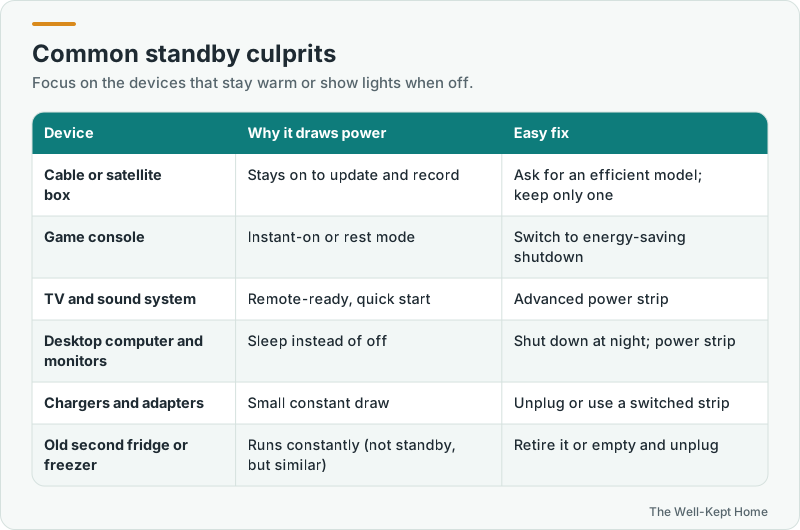
- Cable and satellite boxes, especially DVRs, often draw nearly as much power off as on, because they stay ready to record and update.
- Game consoles in instant-on or rest mode keep themselves partly awake for quick startup and downloads.
- TVs, soundbars, receivers, and subwoofers in quick-start or network standby modes.
- Desktop computers and monitors left in sleep mode, plus printers and external drives.
- Chargers and power adapters, the small black boxes, which draw a little even with nothing connected.
- Appliances with clocks and displays, like microwaves and coffee makers. Each is small, but there are many.
Step 1: Measure before you unplug
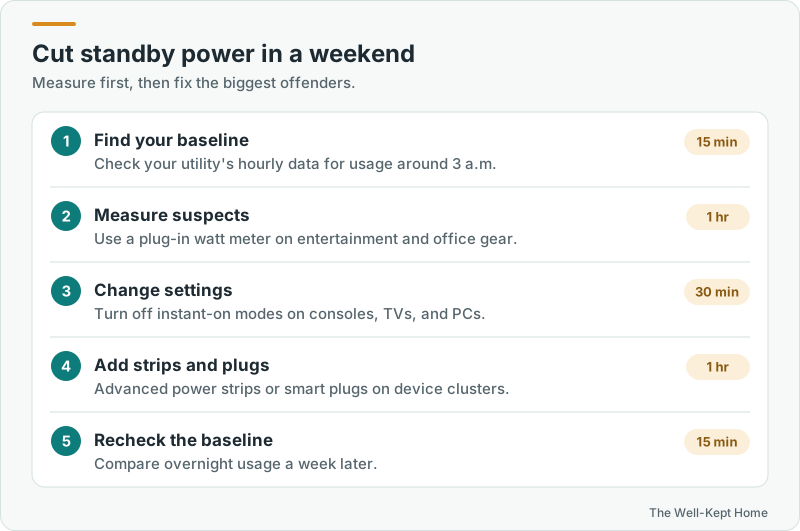
Start by finding your home’s baseline: the electricity it uses when nothing should be running. Many utilities with smart meters show hourly usage online. Look at the hours around 3 a.m. That number includes things that must run, like the refrigerator, but a high overnight baseline points to standby waste or something left on.
Then use a plug-in watt meter to measure suspects. Plug a power strip with the TV, console, and sound system into the meter, turn everything off, and read the watts. You’ll quickly see which clusters matter.
Step 2: Change settings
- Game consoles: switch from instant-on or rest mode to an energy-saving shutdown option in the power settings. You’ll wait a few more seconds at startup.
- TVs: turn off quick-start or “instant on” features if you don’t need them.
- Computers: set them to sleep after a short idle time and shut down at night. Turn off monitors and printers when you’re done.
- Cable boxes: ask your provider whether a more efficient model is available, and return extra boxes in rooms where you rarely watch.
Step 3: Use advanced power strips and smart plugs
An advanced power strip cuts power to accessory devices when the main device turns off. When you switch off the TV, the soundbar, console, and streaming box shut off too. They’re ideal for entertainment centers and computer desks. Smart plugs can cut power on a schedule, for example turning off a guest room TV or an office setup overnight.
Step 4: Unplug what you rarely use
The spare TV in the guest room, the old stereo in the basement, the second game console, the treadmill with an always-on display: if you use something a few times a year, unplug it.
What not to unplug
- Refrigerators and freezers
- Medical equipment
- Smoke and carbon monoxide alarms, security systems, and sump pumps
- Your internet router and modem, if you rely on them for security cameras, alarms, or remote work
- DVRs with scheduled recordings, and devices that need overnight updates
Bigger than standby: always-on loads
While you’re measuring, watch for devices that aren’t in standby at all but simply run constantly: an old second fridge in the garage, a dehumidifier, an aquarium heater, a gaming PC left on. These often use more than all your standby devices combined. See what uses the most electricity in a home.
Buying new
When you replace electronics, ENERGY STAR certified models generally use less power in both active and standby modes. Check the standby power listed in the specifications, especially for TVs, set-top boxes, and audio equipment.
Common questions
Is it worth unplugging phone chargers?
A single modern charger draws very little with nothing attached. It’s a fine habit, but your time is better spent on consoles, cable boxes, and entertainment centers.
Do smart home devices add a lot of standby power?
Each smart speaker, display, or hub draws a little continuously. A handful is modest, but dozens add up. Remove ones you don’t use.
How much can I really save?
It depends on how many electronics you have. Households with several TVs, consoles, and computers often see the biggest drop in their overnight baseline after changing settings and adding power strips.